

While procuring a zone-based PA system, integrators and system installers often discuss the major components like speakers and amplifiers. Most of the budget goes to these devices, whereas the other components that make it easy to operate the PA system, such as the call station and keypad.
A call station allows the operator to make announcements and pass on the information to a large group of people. The keypad is used for zone selection, which helps to divert the announcements to the area where the relevant audience is present. In large public address or PA systems, expansion keyboards or touchscreen panels help operators manage multiple zones without making the process complex.
Choosing the right call station and keypad combination is not as simple as buying a microphone. You will have to select the best device for the best PA system that serves as the operator interface in a large facility or building. This guide will explain everything you should know about buying the right call station and keypad for your installation.
What is a Call Station in a PA System?
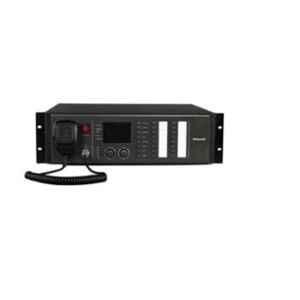
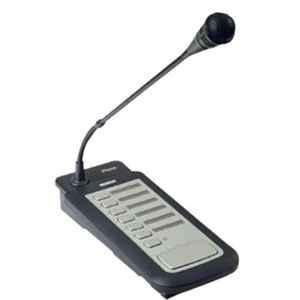
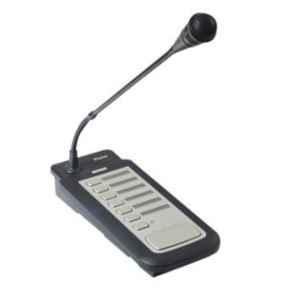
A call station is a paging device used in a PA system for making announcements and controlling where the audio is broadcast. The device allows the operators to manage multiple zones simultaneously for diverting the relevant messages to specific zones in a facility or building. The zones can be predetermined or selected individually in real-time. More advanced call systems offer more features such as background music selection and all-call, priority announcements, and prerecorded messages.
What Does a Keypad Do in a PA System?
A keypad in the PA system is used for diverting announcements to specific zones. In a small PA system, individual buttons are enough to handle a few zones. However, in larger facilities or buildings with numerous zones, installing a separate button for each becomes impractical. This is where a dedicated keyword makes things simpler. It comes with more zone selection buttons to sync the announcements instantly.
In a PA system, keypad buttons are assigned to:
- Individual zones
- Multiple zones
- Zone groups
- All Call
- Background music functions
- Prerecorded messages
- Other programmable system functions
- Call Station vs Paging Microphone: What’s the Difference?
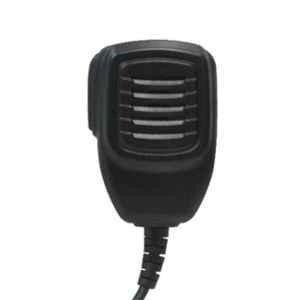
A simple paging microphone is designed to send audio announcements, whereas a call station helps to control where the announcements can be broadcast.
Call Station vs Paging Microphone: Key Differences
| Feature | Paging Microphone | Call Station |
| Voice announcements | Yes | Yes |
| PTT control | Usually | Yes |
| Zone selection | Limited/basic | Yes |
| Multiple-zone selection | Limited | Usually |
| Zone groups | System dependent | Often supported |
| All Call | System dependent | Common |
| Status indication | Limited | More extensive |
| Programmable functions | Limited | Often supported |
| Expansion | Limited | Often available |
The most practical application of a call station and keypad is to allow operators to make several announcements to different areas in large spaces such as schools, hospitals, factories, corporate parks, and more.
Types of Call Stations and Keypads Used in PA Systems
Fixed-Button Call Stations
These types of devices have dedicated zone buttons to make announcements. They are perfect for straightforward zone layouts where operators need to make quick announcements like in schools, factories, and more.
They offer benefits such as:
- Quick operation
- Easy to understand
- Tactile feedback
- No menu navigation
- Suitable for frequently used zones
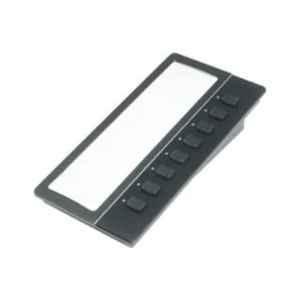
Expansion Keypads
These types of keypads provide more physical zone selection buttons in an existing call station. This is very useful when the initial number of zones exceeds the primary device’s zone selection capacity.
Numerical Keypads
Numerical keypads make things easier for the operator with a numerical interface allowing them to type or select a zone number to make announcements instead of assigning separate physical buttons for every zone.
Touchscreen Call Stations
Touchscreen call stations replace the traditional physical button devices with visual interfaces. Modern call stations with touchscreen can even show different zone names and system functions along with groups. These devices are essential in large facilities with numerous zones like a corporate office park.
IP-Based Call Stations
They are IP/networked paging stations that use ethernet-based connection to communicate with the zone system.
They can be useful for:
- Large campuses
- Multiple buildings
- Distributed facilities
- Network audio systems
- Centralized management
- Systems requiring future expansion
Physical Buttons or Touchscreen: Which Is Better?
There is no universal winner.
Physical buttons
Best when:
- Zones rarely change
- Operators need fast access
- The system is used frequently
- Simplicity is important
- Emergency operation is a consideration
Limitations:
- Requires more physical space
- Harder to scale to very large zone counts
- Zone changes may require relabelling or reconfiguration
Touchscreen
Best when:
- There are many zones
- Zone names need to be customized
- Groups change frequently
- The system has advanced functions
- A visual interface is preferred
Limitations:
- Higher system complexity
- Menu navigation may take longer
- More dependent on software and configuration
How to Choose the Right Call Station and Keypad for a PA System?
| Factor | What to Consider |
| Number of zones | Match the station to current zones and allow for future expansion. |
| Zone selection | Check for individual, multiple and group zone selection. |
| Keypad size | Choose enough physical keys for frequently used zones. |
| Zone groups | Use groups to simplify common multi-zone announcements. |
| All Call | Ensure facility-wide paging is supported when required. |
| Status indication | Look for LEDs or displays showing selected, active or faulted zones. |
| Programmable controls | Consider controls for chimes, messages, BGM and other functions. |
| Interface type | Choose physical buttons, numeric controls or touchscreen based on system size and usability. |
| Connectivity | Check whether it uses dedicated, digital or IP/network connections. |
| Compatibility | Verify compatibility with the PA controller, amplifier, matrix and other components. |
| Priority control | Ensure priority or emergency announcements can override routine paging. |
| Expansion | Check how many additional zones or keypads can be added later. |
| Emergency requirements | For voice-alarm systems, verify applicable certifications and system compatibility. |
| Ease of operation | Operators should be able to select zones and make announcements quickly and accurately. |
Conclusion
Choosing the right call station and keypad is essential for smooth zone-based PA operation. Consider the number of zones, selection method, connectivity, compatibility, expansion, and emergency requirements before buying. The right combination makes announcements easier to manage, reduces operator errors, and ensures effective communication across different areas of a facility.