


Access control systems in 2026 cannot facilitate higher security if the choice of reader is not right. The type of reader you choose affects various factors like overall system cost, installation process, compliance, security level, and maintenance cost. Mostly, system integrators and security system installers often choose the reader that they have used before. But this may not be the best way to choose for every client and project.
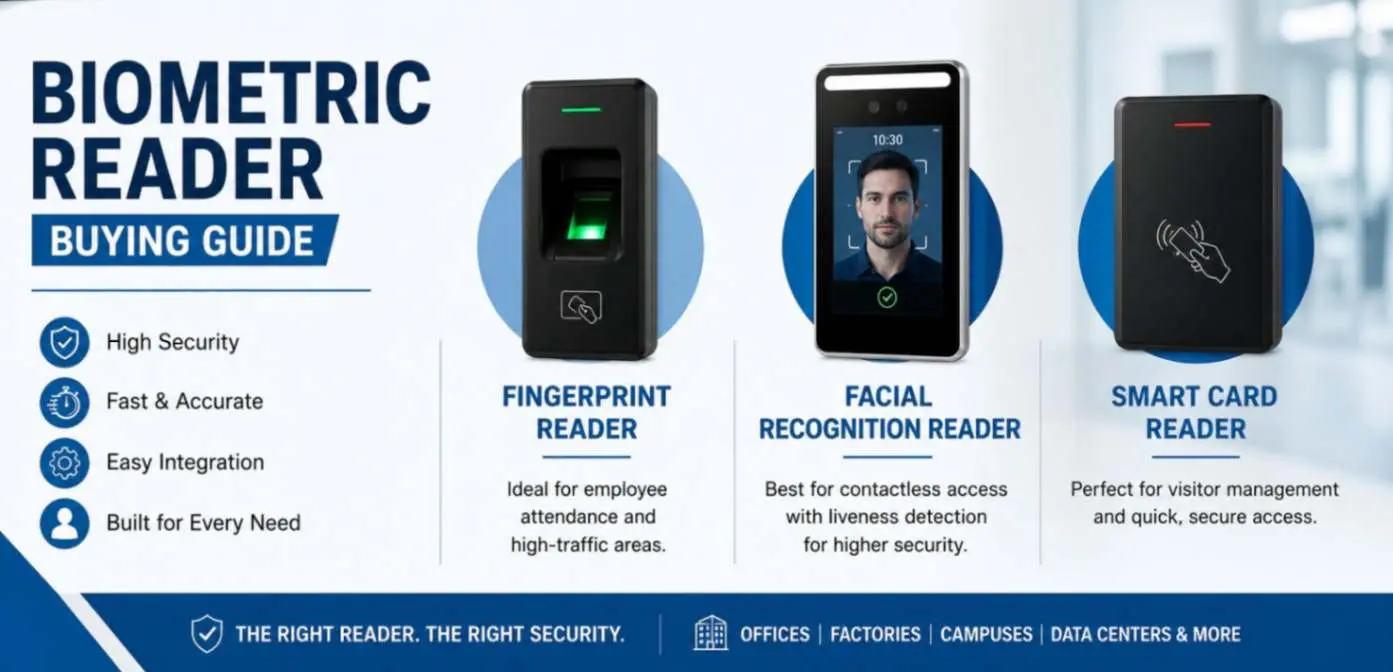
There are three major types of biometric readers used in access control systems for authorizing access: fingerprint, facial recognition, and smart card readers. This guide compares all three, allowing you to choose the best and most suitable biometric reader for your access control systems. We will get into the details, such as reader accuracy, cost, and major differences.
What Does an Access Control Reader Actually Do?
An access control reader is a device that confirms the credentials of users to grant or deny entry into a building or specific room. It is connected to the company’s central database to detect facial structure, scan fingerprints, or read smart cards to let authorized individuals enter. The reader does not make the access decision and only reads and transmits the data to the controller to verify the credentials and send the door unlocking signal to the hardware.
Here are the three major factors that determine whether the reader is right for a system:
Type of Credential: Whether the device can read smart cards, scan fingerprints, or detect faces.
Communication Protocol: It tells how a device communicates with other devices, such as using Wiegand, RS-485, or OSDP, which helps you determine whether it is compatible with existing systems or not.
Storage Location: The reader saves information on the device or local server, or in the cloud. Choose the best option for data protection.
Types of Biometric Readers
Fingerprint Readers
Fingerprint readers are the most commonly used biometric options in access control systems installed at corporate offices, schools, hospitals, government facilities, and even industrial factories. These devices can store the fingerprint pattern of a person and match it later to grant or deny access. Moreover, the installation and operational costs of these are relatively affordable.
Understanding Fingerprint Accuracy
Fingerprint readers use two important accuracy measures: False Acceptance Rate (FAR) and False Rejection Rate (FRR). FAR shows how often the reader mistakenly allows an unauthorized person to enter. FRR shows how often it wrongly rejects an authorized user.
How They Work:
Fingerprint readers use one of three sensor technologies:
- Optical Sensor: Involves capturing the image of the fingerprint pattern and is more affordable.
- Capacitive Sensors: Easily detect and differentiate between the fingerprint ridges and valleys. With Mid-range cost, they are more accurate and faster than optical sensors.
- Multispectral Sensors: Use multiple wavelengths of light to detect surface and fingerprint patterns. They are the most accurate, with the ability to detect dirty, wet, or worn fingerprints, and are best for high-traffic locations like factories, warehouses, and more.
Facial Recognition Readers
Facial recognition readers are also a very common choice in high-traffic areas like corporate offices and industrial factories. Their identity verification speed and accuracy are the biggest advantages due to which it is preferred as a contactless option.
A Major Feature to Look for: Liveness Detection
Not every reader provides the same level of security. While sourcing a face recognition device, you must ensure it has liveness detection ability to get 3D depth sensing, which enhances its accuracy.
Basically, the reader should have a liveness detection feature instead of 2D facial scanning, which can be easily fooled as they compare the camera image with a stored photo. These advanced readers perform critical checks like infrared and movement analysis to confirm the identity with 3D depth sensing.
Smart Card Readers (RFID or Prox.)
Smart card readers are the most efficient and oldest technologies still used today. They are highly favoured for their simplicity, providing access to whoever holds an access card or the right credential. They do not require a pre-registration process like fingerprint and face recognition devices.
Should You Choose 125 kHz Proximity Cards vs. 13.56 MHz Smart Cards?
When you decide to choose a smart card biometric reader for your access control system, you will have to make a choice between using 125 kHz proximity cards or 13.56 MHz smart cards as access credentials.
125 kHz Proximity Cards: These cards are based on older technology, having a simple and fixed identification code. This is why they can be easily cloned and cannot be used in high-security areas.
13.56 MHz Smart Cards: These cards, such as HID iCLASS, MIFARE, and MIFARE DESFire, are best for modern security systems with high-quality encryption. They cannot be easily cloned, which makes them perfect for high-security zones.
Side by Side Comparison of Fingerprint, Facial, and Smart Card Biometric Readers
| Factor | Fingerprint | Facial Recognition | Smart Card |
| Security level | High | Very high with liveness detection | Medium with 13.56 MHz; low with 125 kHz |
| Spoofing resistance | Moderate; performance can be affected by worn or damaged fingerprints | High with liveness detection; lower without it | Higher with modern smart cards; legacy 125 kHz cards have higher cloning risk |
| Speed per user | 1-2 seconds | Under 1 second; contactless | Under 1 second |
| Enrollment / setup | Moderate; around 15-30 seconds per user | Moderate; similar to fingerprint | Minimal; card can be issued almost instantly |
| Hygiene | Requires physical contact | Fully contactless | Usually contactless |
| Approx. cost per door | Rs 15,000 – Rs 35,000 | Rs 20,000 – Rs 90,000 | Rs 12,000 – Rs 30,000 |
| Best suited for | Factories, warehouses, and employee attendance | High-traffic offices and sites where contactless access is preferred | Visitor, contractor, and large-scale access where quick card issuance is important |
So, Which Biometric Reader Should You Use Based on the Application?
- For staff attendance in a factory or warehouse: A fingerprint reader with a multispectral sensor for dirty or worn prints.
- For high-traffic corporate lobby or business park entrance: A facial recognition reader with liveness detection.
- For visitor management or temporary space: A 13.56 MHz smart card reader.
- For server rooms or other high-security zones: You should choose a multi-factor reader with card-plus-biometric security.


